
Building a smart home apartment setup when you rent is mostly a question of reversibility. The best upgrades plug in, screw into an existing socket, sit on a shelf, or attach with removable adhesive. They make daily life easier without turning move-out day into a repair project.
That makes a renter setup different from a homeowner setup. Instead of starting with hardwired switches, permanent cameras, or major HVAC changes, a renter-friendly smart apartment works best when every device can be unplugged, removed, reset, and taken with you.
This guide focuses on practical apartment-friendly upgrades that do not require rewiring. Lease rules still vary, especially for door hardware, cameras, and adhesive mounting, so check your agreement before changing anything attached to the property.
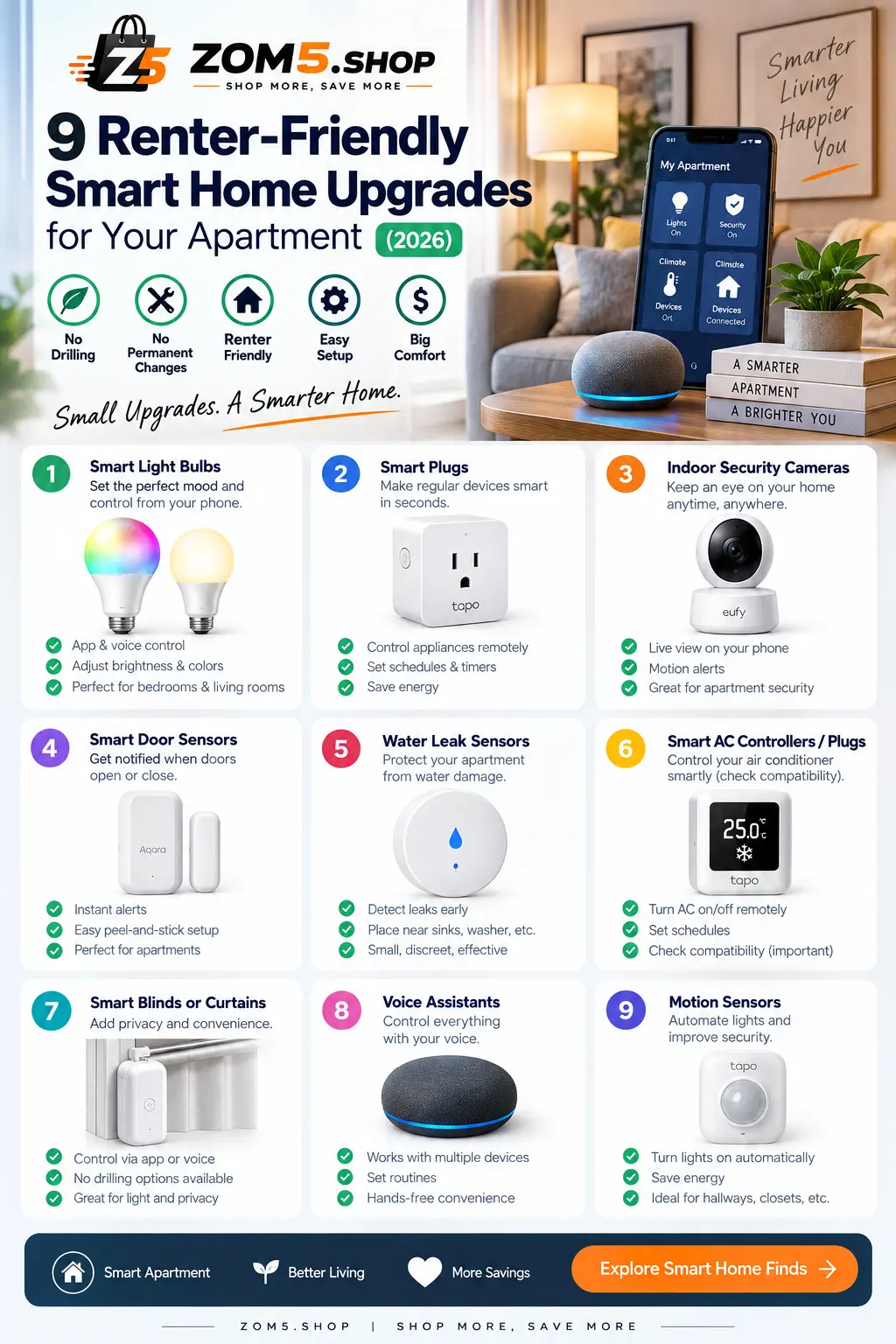
Why a Smart Home Apartment Needs a Different Plan
A lot of smart-home advice assumes you can replace switches, open walls, drill mounts, or swap door hardware. Renters usually have a different priority list:
- no permanent electrical work
- easy removal at move-out
- minimal wall damage
- devices that can move to a new apartment
- simple setup without buying a large collection of hubs
The goal of a smart home apartment is not to automate everything. It is to remove small annoyances: turning off a lamp from bed, scheduling a fan, getting an alert when a door opens, checking for a leak under a sink, or controlling an old air conditioner with a remote.
1. Smart Plugs: The Easiest Place to Start
For many renters, a smart plug is the most useful first purchase because it changes nothing about the apartment itself. It sits between the wall outlet and a device you already own.
Smart plugs work especially well with:
- table and floor lamps
- fans
- holiday or decorative lights
- humidifiers that resume operation when power returns
- simple appliances with physical on/off controls
The main things to check are outlet size, maximum load, whether the plug blocks the second socket, and whether the device you are controlling actually resumes when power is restored. A smart plug cannot press a physical start button for you.
For a smart home apartment, compact plugs with scheduling and energy monitoring can be particularly useful because outlet space is often limited.
2. Smart Bulbs: Better When You Want Dimming or Color Control
A smart plug can turn a lamp on and off. A smart bulb can usually do more: dimming, warm-to-cool white adjustment, scenes, schedules, and sometimes color.
That makes smart bulbs a stronger fit when the quality of the light matters, not just whether it is on. If you are planning bedroom brightness, our bedroom lumens guide explains how much light different room sizes typically need. Smart bulbs are also very renter-friendly because you can keep the original bulbs and reinstall them when you move.
One limitation is the wall switch. If someone turns the physical switch off, many smart bulbs lose power and stop responding to apps or voice control. In shared homes, that small detail can be annoying.
3. Smart Bedside Lamps: One Device Instead of Several Pieces
If you are building the smart home around the bedroom, an integrated smart bedside lamp can be cleaner than combining a regular lamp, smart bulb, and separate controls. Depending on the model, you may get dimming, schedules, color temperature adjustment, touch controls, and voice integration in one device.
Our guide to the best smart bedside lamps covers this category in more detail.
This is also a good example of a renter-friendly rule: choose products that still work reasonably well from physical controls if the app, Wi-Fi, or voice assistant is unavailable.
4. Adhesive Door and Window Sensors
Contact sensors are small two-piece devices that can detect when a door or window opens or closes. In an apartment, they can be useful for security alerts, simple automations, or reminders.
For example, a door sensor can trigger an entry light, notify you if a balcony door is left open, or act as one part of a larger alarm system.
Renters should pay close attention to the mounting method. Adhesive installation can be reversible, but paint quality, heat, humidity, and the adhesive itself affect removal. Test carefully rather than assuming every adhesive strip is damage-free on every surface.
5. Water Leak Sensors for Sinks, Laundry Areas, and Bathrooms
Leak sensors are one of the least flashy smart-home devices, but they solve a very real apartment problem. A small battery-powered sensor can sit near a washing machine, water heater, sink cabinet, toilet, or other leak-prone area and alert you when it detects water.
They are especially renter-friendly because most models simply sit on the floor or inside a cabinet. No drilling is required.
If you live above another apartment, early leak detection can be more useful than another decorative automation. The best location depends on where water damage is realistically most likely in your unit.
6. Freestanding Indoor Cameras
An indoor camera can be renter-friendly when it sits on a shelf or furniture instead of being permanently mounted. It can cover an entry area, pets, or a room while you are away.
Before buying one, look beyond resolution. Consider:
- local storage versus cloud-only recording
- whether useful features require a subscription
- privacy controls and physical shutters
- two-factor authentication
- how long the manufacturer provides software updates
The U.S. Federal Trade Commission recommends securing internet-connected devices by changing default credentials, using two-factor authentication when available, and keeping devices and routers updated. See the FTC’s consumer guidance for securing connected devices.
7. Smart Speakers and Portable Hubs
A smart speaker can act as the control layer for a renter setup without changing the apartment at all. It sits on a shelf, moves with you, and can control compatible plugs, lights, sensors, locks, and routines.
You do not necessarily need a separate hub for every smart-home device. Some devices connect directly over Wi-Fi, while others use Thread, Zigbee, or another low-power protocol and may need a compatible controller or bridge.
For a small apartment, simplicity usually wins. Adding a hub only makes sense when the devices you want actually benefit from it.
8. Retrofit Smart Locks: Useful, but Check the Door First
Some smart locks are designed to fit over the interior portion of an existing deadbolt rather than replacing the entire lock. That can make them more renter-friendly than a full lock replacement.
But this category needs more caution than a smart plug or bulb. Door hardware can be part of the property, building access rules may apply, and the lock still needs to work correctly for the owner or property manager where required.
Before buying a retrofit lock, check the exact deadbolt shape, door clearance, lease terms, and whether the original hardware remains fully usable.
9. IR Blasters for TVs, Fans, and Some Air Conditioners
If you already own appliances controlled by an infrared remote, a small smart IR hub can sometimes add app and voice control without replacing the appliance.
This can be particularly useful in rental apartments with:
- window or split AC units that use IR remotes
- televisions
- older fans with remotes
- media equipment
The limitation is line of sight. An IR blaster generally needs a clear path to the device, and compatibility varies by model and remote code.
What Is Matter, and Does It Help Renters?
Matter is a smart-home connectivity standard designed to improve compatibility between supported devices and major ecosystems. The Connectivity Standards Alliance describes Matter as a way for compatible products from multiple brands to work together more easily across smart-home platforms. You can read the Alliance’s official Matter overview.
For renters, the practical benefit is flexibility. If you move, change phones, or switch between Alexa, Google Home, Apple Home, or another supported platform, Matter-certified products can reduce some ecosystem lock-in.
That does not mean every Matter device works identically with every platform, and it does not make older devices obsolete. Treat the Matter logo as a useful compatibility signal, not a guarantee that every feature is available everywhere.
A Simple Smart Home Apartment Starter Plan
Pick the room with the most daily friction. Usually the bedroom or living room.
Use one main app or voice ecosystem at first instead of installing five unrelated apps.
Add sensors or extra automation after the first devices prove they save time or solve a real problem.
A good starting setup might be two smart plugs, one or two smart bulbs, and the phone or smart speaker you already use. That is enough to learn whether automation actually improves your routine before spending more.
What Renters Should Avoid
The biggest mistake is buying smart-home gear because it looks impressive rather than because it fits the apartment.
Be cautious with:
- hardwired switches when you cannot modify wiring
- permanent outdoor cameras or doorbells without permission
- large ecosystems that require several hubs before solving one simple problem
- devices that become nearly useless without an ongoing subscription
- products with unclear software-support policies
- automations that create safety risks if they switch high-power appliances unexpectedly
Also avoid assuming that every appliance is safe to automate with a smart plug. Air conditioners need extra care because compressor startup current can be much higher than normal running current. If you are considering that setup, read our smart plug for air conditioner safety guide before connecting one. Always stay within the plug manufacturer’s electrical rating and follow the appliance manufacturer’s instructions.
Smart-Home Security Basics Before You Add More Devices
A larger smart home also means more connected devices on your network. Keep the setup simple and maintainable.
- Use a strong, unique Wi-Fi password.
- Change default device passwords.
- Enable two-factor authentication where available.
- Keep router and device firmware updated.
- Remove old devices from your account when you stop using them.
- Factory-reset devices before selling or giving them away.
You do not need advanced networking knowledge to get the basics right. The important part is treating smart plugs, cameras, speakers, and sensors like small computers rather than ordinary household objects.
Frequently Asked Questions
Can renters have a smart home?
Yes. A renter-friendly smart home can be built mostly from plug-in, screw-in, battery-powered, and freestanding devices. Permanent changes should be checked against your lease or approved where necessary.
What is the best first smart-home device for an apartment?
For most people, a smart plug is the easiest starting point because it requires no wiring and can automate a lamp, fan, or another compatible device you already own.
Do I need a smart-home hub in a small apartment?
Not always. Many Wi-Fi devices work directly with an app or smart-home platform. Some sensors and Thread, Zigbee, or other devices need a compatible controller or bridge. Buy a hub because your chosen devices require it, not because every smart home supposedly needs one.
Can I build a smart home without drilling?
Yes. Smart plugs, smart bulbs, smart lamps, freestanding cameras, portable hubs, leak sensors, and many other devices need no drilling. Door and window sensors often use adhesive, which still needs to be tested carefully on rental surfaces.
Is Matter worth looking for when renting?
It can be. Matter support can make compatible products easier to use across major ecosystems, which is useful when you want devices that can move with you and are less tied to one brand.
Final Thoughts
The best smart home for renters is not the one with the most devices. It is the one that can be removed cleanly, moved easily, and still solves everyday problems.
Start small. Automate one lamp, one fan, or one routine. Then add sensors or security devices only when you know exactly what they are supposed to improve.
That approach is cheaper, easier to maintain, and far more likely to survive your next move.